Quick Start
The board works without a controller: plug a USB-C PD charger in, switch the slide switch on, and the HUSB238 asks for the voltage set on the DIP switches. With every switch off, that is 20 V at 3.25 A. The purple LED lights while the output is on. To read what the charger agreed to from code, connect the I2C header to a controller and run the library's first example.
You program the controller connected to this breakout. The breakout itself is not flashed.
VOUT carries the negotiated voltage, up to 20 V. Never connect VOUT to
your controller's 3.3 V or 5 V pins. Only SDA, SCL and GND go to the
controller.
- Arduino
- MicroPython
1. Connect the breakout board
Solder the included header pins, then wire the 3-pin I2C header to your
controller's I2C pins. Basic.ino calls begin() without pins, so the library
uses your controller's default I2C pins (its Wire pins). The table and drawing
below show one example controller, whose default pins are IO8 (SDA) and IO9
(SCL). On another board, connect SDA and SCL to that board's default I2C
pins, and GND to GND. The HUSB238 takes its power from USB-C, so the header
has no supply pin. The board has no pull-up resistors on SDA and SCL: the
bus needs them on your controller board or as separate resistors.
| NULA DeepSleep | Soldered HUSB238 USB-C Power Delivery Breakout |
|---|---|
| IO9 | SCL |
| IO8 | SDA |
| GND | GND |
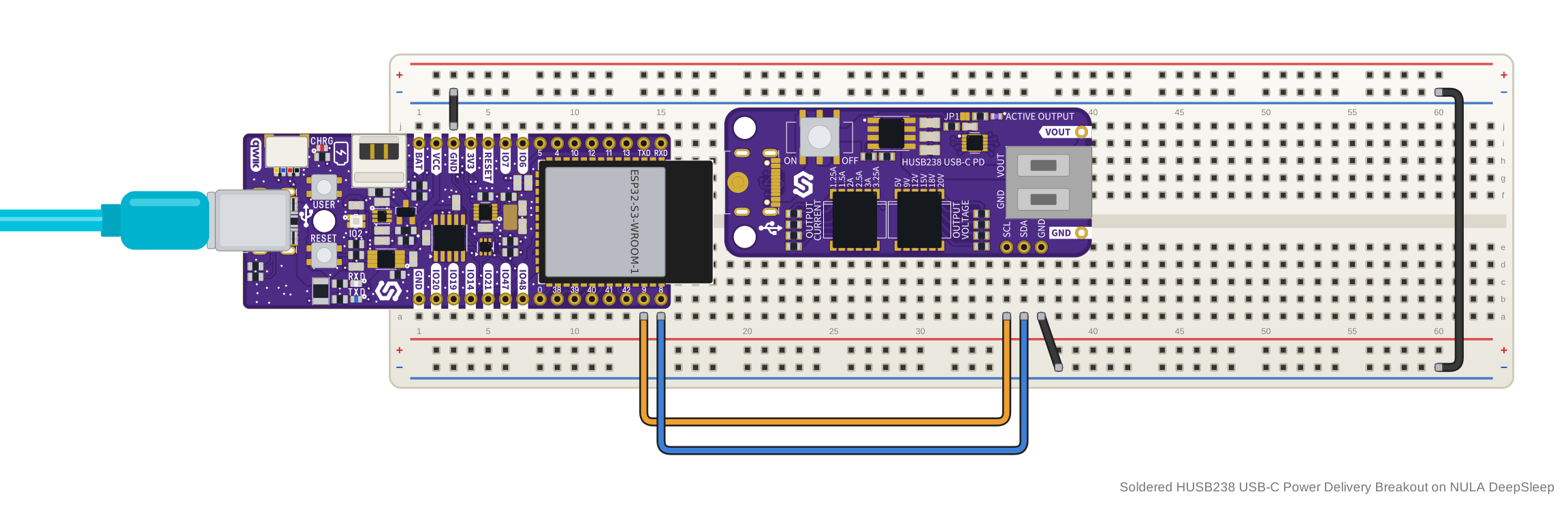
Then plug a USB-C PD charger into the board and switch the slide switch on. The HUSB238 only answers on I2C while it has power from USB-C.
2. Install the library
Download the HUSB238 Soldered library from its GitHub repository and add it to the Arduino IDE as a ZIP library.
🔗HUSB238 Soldered Arduino library
Verified Arduino library at commit f66dd25
Tip: downloading from GitHub. On the library's GitHub page, click the green Code button and choose Download ZIP, then add it in Arduino IDE with Sketch → Include Library → Add .ZIP Library....
The ZIP from the library's GitHub page holds the repository's default branch,
so you get its latest version. The examples on these pages were checked against
commit f66dd25, linked above.
3. Run the first example
This is Basic.ino, the library's simplest example. Once a second it checks
whether a PD charger is attached and prints the voltage and current the charger
agreed to. Upload it, then open the Serial Monitor at 115200 baud.
#include "HUSB238-SOLDERED.h"

Husb238 husb238;

void setup()
{
    Serial.begin(115200);
    husb238.begin();
}

void loop()
{
    if (husb238.isAttached())
    {
        Serial.print("Attached, voltage: ");
        Serial.print(husb238.getPDSrcVoltage());
        Serial.print(" V, current: ");
        Serial.print(husb238.getPDSrcCurrent());
        Serial.println(" A");
    }
    else
    {
        Serial.println("Not attached");
    }

    delay(1000);
}
4. Check the result
With a PD charger attached, a new line appears every second. It starts with
Attached, voltage:, then gives the agreed voltage in volts and the charger's
current in amps. When no PD charger is attached, each line reads
Not attached. The numbers depend on your charger and on the DIP
switches.
With a 65 W USB-C PD charger that offers 20 V at 3.25 A, and every DIP switch off, the Serial Monitor shows:
Attached, voltage: 20.00 V, current: 3.25 A
Attached, voltage: 20.00 V, current: 3.25 A
Attached, voltage: 20.00 V, current: 3.25 A
Attached, voltage: 20.00 V, current: 3.25 A
5. If it does not work
Continue with Troubleshooting and retry this smallest example after each change.
1. Connect the breakout board
Solder the included header pins, then wire the 3-pin I2C header to your
controller. The example creates the I2C bus on GPIO 8 (SDA) and GPIO 9
(SCL); change those two pin numbers in the example if your board uses others.
The table and drawing below show one example controller, where those pins are
marked IO8 and IO9. On any other board, connect SDA and SCL to the two pins
you set in the example, and GND to GND. The board has no pull-up resistors
on SDA and SCL: the bus needs them on your controller board or as separate
resistors.
| NULA DeepSleep | Soldered HUSB238 USB-C Power Delivery Breakout |
|---|---|
| IO9 | SCL |
| IO8 | SDA |
| GND | GND |
Then plug a USB-C PD charger into the board and switch the slide switch on. The HUSB238 only answers on I2C while it has power from USB-C.
2. Install the module
After installing the mpremote package, install the library on your board using the following command:
mpremote mip install github:SolderedElectronics/Soldered-HUSB238-MicroPython-Library
Or, if you're running a Windows OS:
python -m mpremote mip install github:SolderedElectronics/Soldered-HUSB238-MicroPython-Library
This command installs the module from the repository's default branch, so you
get its latest version. The examples on these pages were checked against
commit 7184665, linked below.
🔗Soldered HUSB238 MicroPython library
Verified MicroPython module at commit 7184665
Tip: downloading from GitHub. Without mpremote, open the module's .py
file on GitHub and click Download raw file, then open it in Thonny and use
File → Save as... → MicroPython device to copy it onto the board.
3. Run the first example
This is husb238-basic.py, the module's simplest example. Once a second it
checks whether a PD charger is attached and prints the voltage and current the
charger agreed to.
from machine import I2C, Pin
import time
from husb238 import HUSB238

# Change these to match how your board wires I2C
i2c = I2C(0, scl=Pin(9), sda=Pin(8))
husb238 = HUSB238(i2c)

while True:
    if husb238.isAttached():
        print("Attached, voltage: {} V, current: {} A".format(
            husb238.getPDSrcVoltage(), husb238.getPDSrcCurrent()))
    else:
        print("Not attached")

    time.sleep(1)
🔗Open the complete example
Examples/husb238-basic.py at commit 7184665
4. Check the result
With a PD charger attached, a new line appears in the shell every second. It
starts with Attached, voltage:, then gives the agreed voltage as a whole
number of volts and the charger's current in amps. When no PD charger is
attached, each line reads Not attached. The numbers depend on your charger and on the
DIP switches.
With a 65 W USB-C PD charger that offers 20 V at 3.25 A, and every DIP switch off, the shell shows:
Attached, voltage: 20 V, current: 3.25 A
Attached, voltage: 20 V, current: 3.25 A
Attached, voltage: 20 V, current: 3.25 A
Attached, voltage: 20 V, current: 3.25 A
5. If it does not work
Continue with Troubleshooting and retry this smallest example after each change.