Hardware Details
The board is built around the DE2120, a camera-based scan engine with a
640 × 480 CMOS image sensor and its own 32-bit decoder. You reach it two ways.
The USB-C connector's data lines go straight to the scanner's USB pins, so a
computer sees it as a USB scanner. The 6-pin header gives a microcontroller the
scanner's UART, its STAT output and its TRIG input. The board also carries
a trigger button, a buzzer, a blue status LED and a purple power LED.
Key specifications
| Specification | Value |
|---|---|
| Interface | |
| Interface | UART (TTL, 9600 baud), USB-C, digital GPIO (STAT, TRIG) |
| Qwiic compatible | No |
| Breadboard compatible | Yes |
| Power | |
| Supply voltage | 5 V over USB-C, or 3.3 V on the 3V3 header pin |
| Logic level | 3.3 V only |
| Operating current | Under 190 mA while scanning |
| Protection | Overcurrent: 500 mA fuse on the USB-C supply |
| Other | |
| Scan engine | DE2120 |
| 1D symbologies | UPC-A, UPC-E, EAN-8, EAN-13, Code 128, GS1-128, Code 39, Code 93, Code 11, Interleaved 2 of 5, Codabar, MSI Plessey, GS1 DataBar |
| 2D symbologies | QR Code, Data Matrix, PDF417, Micro PDF417, Aztec |
| Image sensor | CMOS, 640 × 480 px |
| Scan distance | 25 to 400 mm |
| Scan angles | Pitch ±45°, skew ±40°, roll 360° |
| Illumination | 5600 K white LEDs, 625 nm red aiming LED |
| Scanning modes | Manual (default), continuous, motion sense |
| On board | Trigger button, buzzer, status LED, power LED |
| Connectors | USB-C, 6-pin 2.54 mm header |
| Operating temperature | -20 to 50 °C |
| Dimensions | 54 × 22 mm (2.13 × 0.87 in) |
| Mounting | Two M3 holes |
How far away a code reads depends on its size: the DE2120 specification gives, for example, 110 to 400 mm for Code 39 at 1 mm (40 mil) and 50 to 200 mm for EAN-13 at 0.33 mm (13 mil), measured at 25 °C and 200 lux.
Pinout
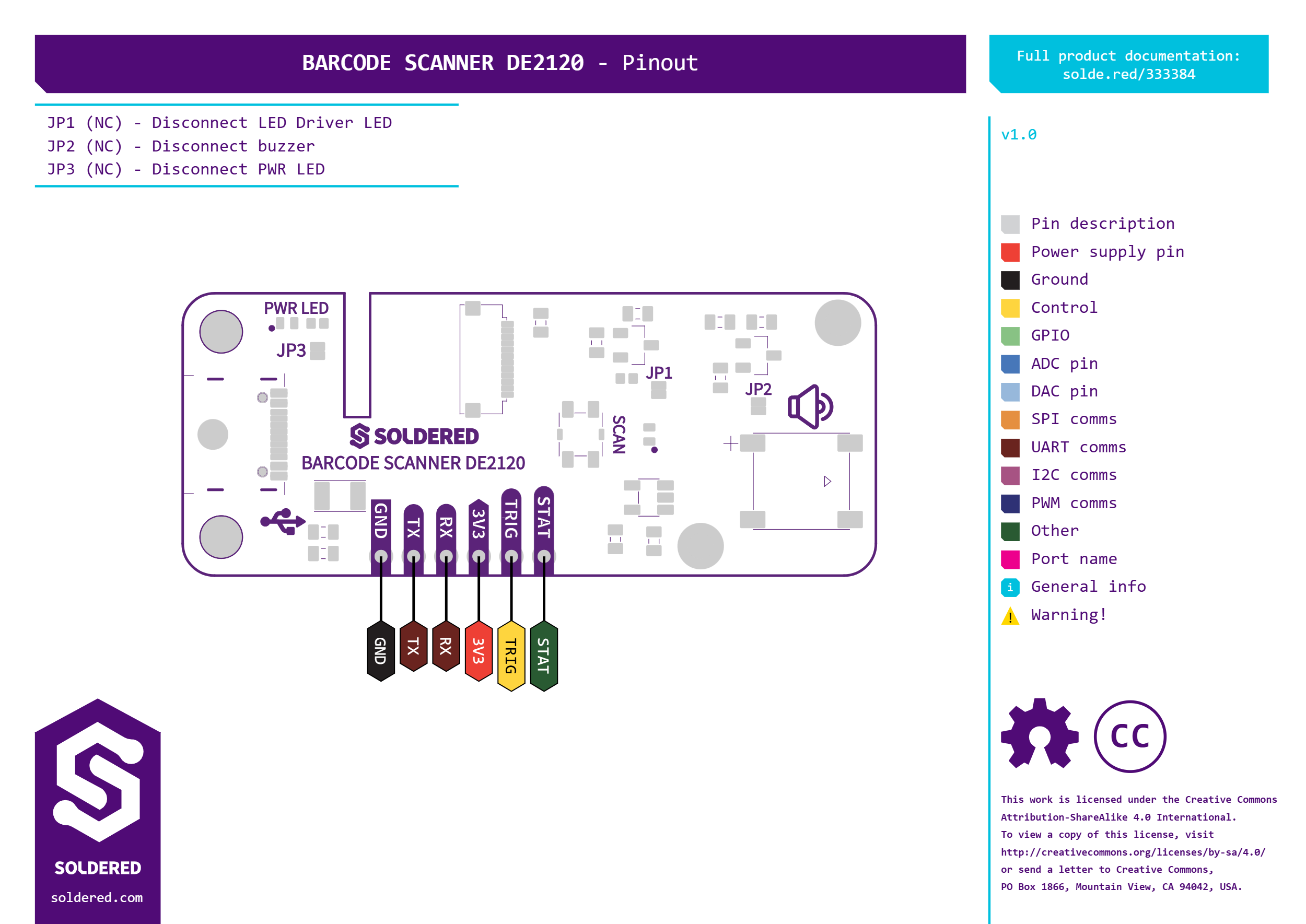
| Pin marking | Pin name | Description |
|---|---|---|
3V3 | 3.3 V supply | The board's 3.3 V rail. Supply 3.3 V here when you power the board from the header. When USB-C powers the board, the on-board regulator drives this rail. |
STAT | Status output | Goes low on every successful decode, so your code can react in hardware. The same signal lights the blue status LED. |
TRIG | Trigger input | Active low: hold it low to trigger a scan. The trigger button on the board pulls it to GND. |
RX | UART receive | The scanner's serial input. Connect it to the controller's TX. |
TX | UART transmit | The scanner's serial output. Connect it to the controller's RX. |
GND | Ground | Common ground for power and signals. |
Voltage and logic levels
| Connection | Supported voltage | Notes |
|---|---|---|
| USB-C | 5 V | Passes a 500 mA fuse, then the on-board regulator makes 3.3 V for the scanner. |
3V3 | 3.3 V | Takes 3.3 V only. |
RX, TX, STAT, TRIG | 3.3 V logic | Use a 3.3 V controller. |
The 3V3 header pin takes 3.3 V only. Do not connect it to 5 V.
Dimensions
The board measures 54 × 22 mm (2.13 × 0.87 in) and has two M3 mounting holes. The DE2120 scan engine on it measures 16.0 × 21.2 × 12.0 mm and weighs under 4 g.
Jumpers
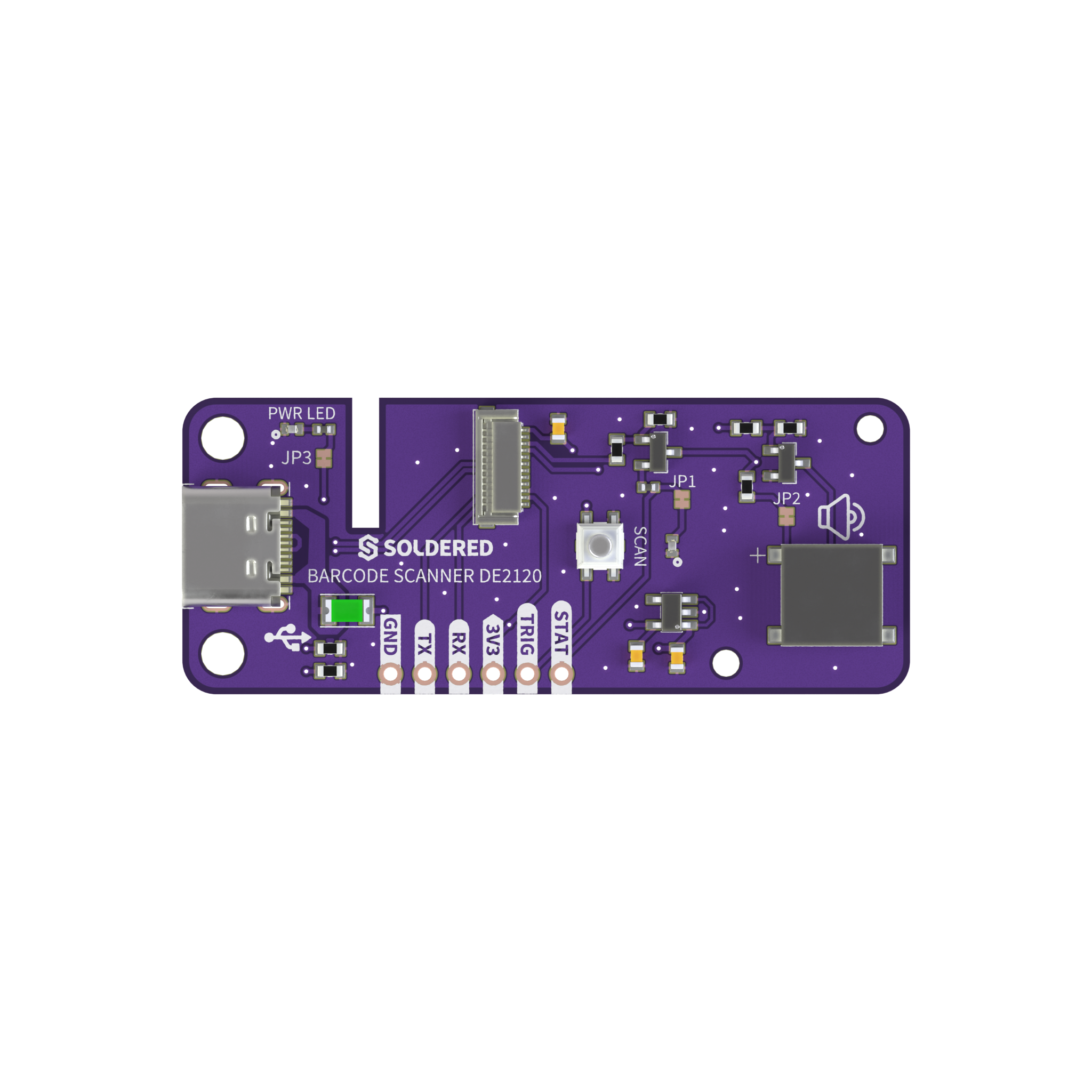
Three solder jumpers switch off the buzzer and both LEDs. Each one is connected by default and switches off one part when you open it.
| Jumper | Default | Function |
|---|---|---|
JP1 | Connected | Blue status LED. Open it to keep the LED dark on a decode. |
JP2 | Connected | Buzzer. Open it to silence the beep. |
JP3 | Connected | Purple power LED. Open it to switch the power indicator off. |