Quick Start
Wire the breakout to your controller's I2C pins, install the Soldered BME690 MicroPython module and run its forced-mode example. It triggers a measurement every second and prints the temperature, pressure, humidity and gas resistance of each measurement it fetches in the shell.
You program the controller connected to this breakout. The breakout itself is not flashed.
- MicroPython
1. Connect the breakout board
The module's examples create the sensor with BME690() and no I2C object. On
the esp32 and esp8266 MicroPython ports (and one Soldered board firmware)
the module then opens I2C(0) with SDA on pin 21 and SCL on pin 22, so wire
those pins. Wired to other pins, or on a port the module does not pick pins
for, create your own machine.I2C on the pins you wired and pass it as
BME690(i2c=...). The header and both Qwiic connectors carry the same 3V3,
GND, SDA and SCL lines.
| NULA Mini | Soldered BME690 AI temperature, humidity & gas sensor breakout |
|---|---|
| Qwiic connector | Qwiic connector |
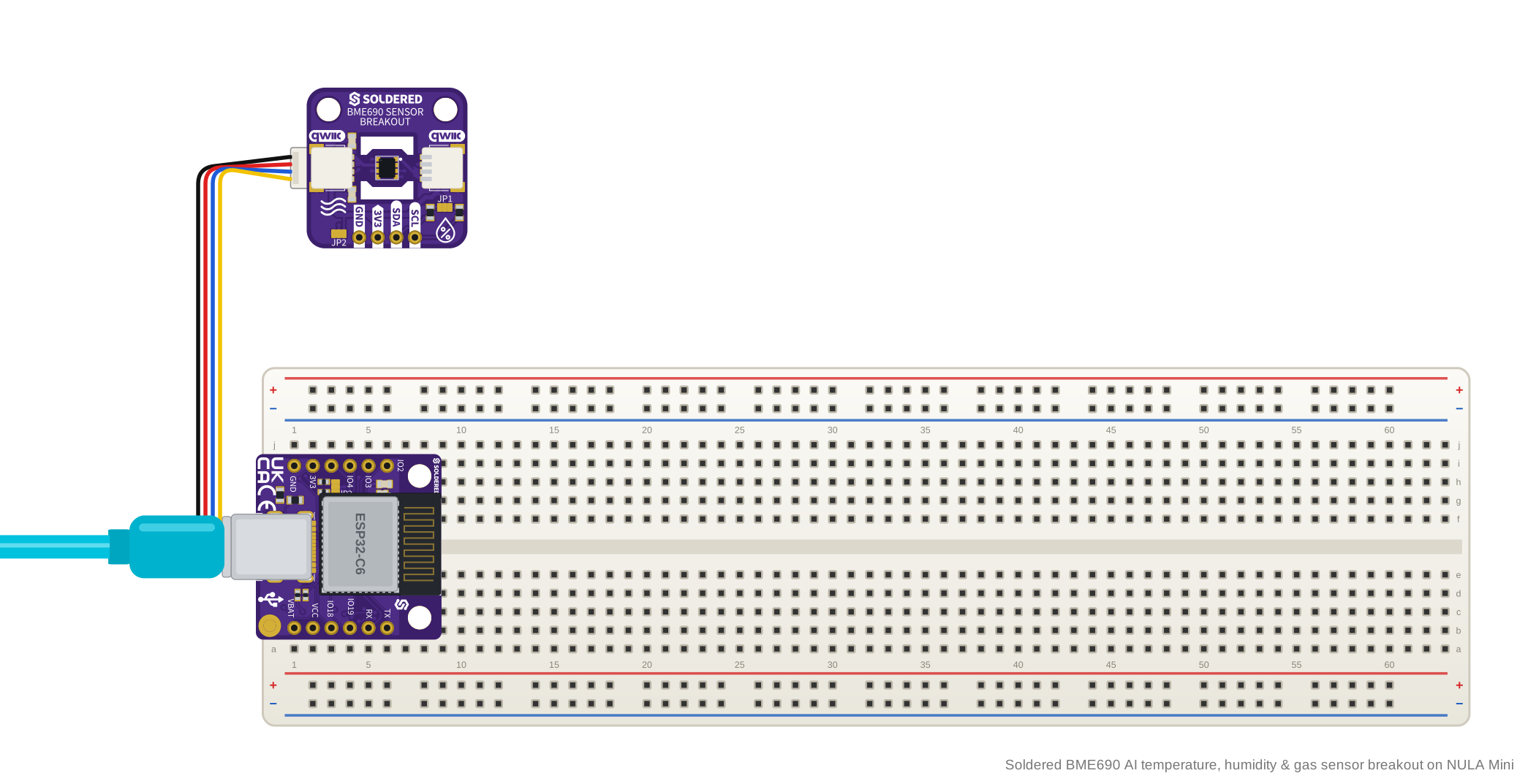
The diagram uses a NULA Mini as one example of a controller, connected with a
Qwiic cable to either of the breakout's Qwiic connectors: both carry the same
four lines. A controller's Qwiic connector is not always on pins 21 and 22: on the NULA
Mini it is on IO6 (SDA) and IO7 (SCL). Check which pins your
controller's connector uses, and pass an I2C object on those pins as described
above.
Power the board from 3.3 V. The 3V3 pin feeds the sensor directly, with no
regulator: it takes 1.71 to 3.6 V, and 4.25 V is the sensor's absolute
maximum.
2. Install the module
Use mim, or, after installing the mpremote package, install the library on your board using the following command:
mpremote mip install github:SolderedElectronics/Soldered-BME690-MicroPython-Library
Or, if you're running a Windows OS:
python -m mpremote mip install github:SolderedElectronics/Soldered-BME690-MicroPython-Library
🔗Soldered BME690 MicroPython library
Verified MicroPython module at commit 91a07b5
Tip: downloading from GitHub. Without mpremote, open the module's .py
file on GitHub and click Download raw file, then open it in Thonny and use
File → Save as... → MicroPython device to copy it onto the board.
3. Run the first example
This is the module's bme690-forcedMode.py example. It sets the oversampling,
an IIR filter and a 300 °C, 100 ms heater step, then triggers one measurement
every second and prints it. If you set the ADDR jumper to 0x77, create the
sensor with BME690(address=BME69X_I2C_ADDR_HIGH) instead, and add
BME69X_I2C_ADDR_HIGH to the names the example imports from bme690. If you
created your own I2C object in step 1, pass it too, as i2c=.
# FILE: bme690-forcedMode.py
# AUTHOR: Josip Simun Kuci @ Soldered
# BRIEF: Read temperature, pressure, humidity and gas resistance from the
#        BME690 in forced mode, one measurement at a time
# WORKS WITH: BME690 breakout board: solde.red/333411
# LAST UPDATED: 2026-09-16

from bme690 import (
    BME690,
    BME69X_ERROR,
    BME69X_FILTER_SIZE_3,
    BME69X_FORCED_MODE,
)
import time

# Start the sensor on the default I2C address (0x76). Use
# BME690(address=BME69X_I2C_ADDR_HIGH) if the address jumper is soldered.
sensor = BME690()

# Oversampling for temperature, pressure and humidity.
sensor.set_tph()

# IIR filter for the temperature and pressure readings.
sensor.set_filter(BME69X_FILTER_SIZE_3)

# Heat the gas sensor plate to 300 degrees Celsius for 100 milliseconds.
sensor.set_heater_prof(300, 100)

if sensor.check_status() == BME69X_ERROR:
    raise Exception("BME690 setup failed: " + sensor.status_string())

print(
    "Timestamp(ms), Temperature(C), Pressure(Pa), Humidity(%), "
    "Gas resistance(Ohm), Status"
)

while True:
    # Trigger a single measurement.
    sensor.set_op_mode(BME69X_FORCED_MODE)

    # Wait for the measurement to finish, the heater duration included.
    time.sleep_us(sensor.get_meas_dur())

    if sensor.fetch_data():
        data, _ = sensor.get_data()

        print(
            "{}, {:.2f}, {:.2f}, {:.2f}, {:.2f}, 0x{:02x}".format(
                time.ticks_ms(),
                data.temperature,
                data.pressure,
                data.humidity,
                data.gas_resistance,
                data.status,
            )
        )

    time.sleep(1)
🔗Open the complete example
Examples/bme690-forcedMode.py at commit 91a07b5
4. Check the result
The shell first prints the column header:
Timestamp(ms), Temperature(C), Pressure(Pa), Humidity(%), Gas resistance(Ohm), Status
After that, each loop in which fetch_data() finds a new measurement prints one
row in the same order: the
controller's millisecond counter, then temperature in °C, pressure in Pa,
humidity in % r.H. and gas resistance in Ω, each to two decimals, and the status
byte in hex. A status of 0xb0 means new data, a valid gas measurement and a
stable heater.
If the heater setup, the last call before the check, reports an error, the
script stops with BME690 setup failed: and the reason. If
the sensor does not answer at all, the constructor raises
BME690 not responding on address 0x76.
Read in forced mode explains every function the example uses.
5. If it does not work
Continue with Troubleshooting and retry this smallest example after each change.