Quick Start
This board measures acceleration on three axes. Connect it over I2C, install the library for your environment, and run its basic readings example to see the X, Y and Z acceleration in g.
You program the controller connected to this breakout. The breakout itself is not flashed.
- Arduino
- MicroPython
1. Connect the breakout board
Connect the breakout to your controller's 3.3 V, GND and I2C pins. If the controller has a Qwiic connector, a Qwiic cable from it to either Qwiic connector on the breakout does this. Otherwise, solder the included header pins and wire them as this table shows for a NULA DeepSleep:
| NULA DeepSleep | Soldered Ultra-Low-Power Accelerometer BMA400 Breakout |
|---|---|
| GND | GND |
| 3V3 | 3V3 |
| IO8 | SDA |
| IO9 | SCL |
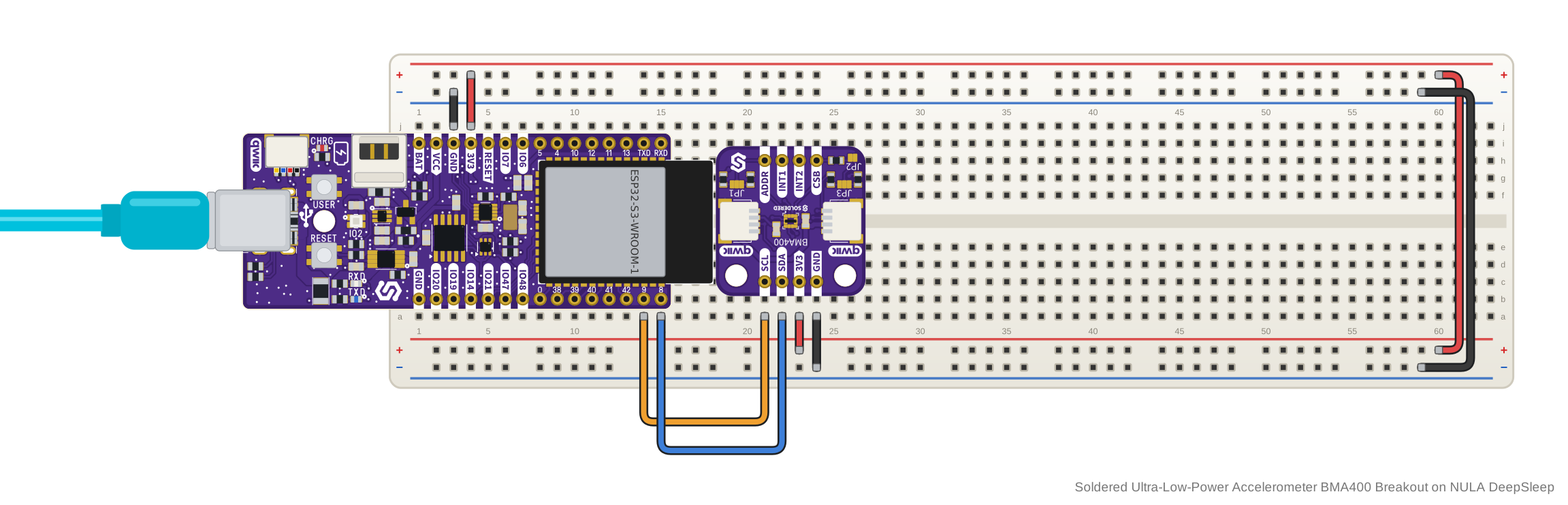
On the NULA DeepSleep, Wire.begin() without arguments uses IO8 as SDA and IO9
as SCL, the pins in this table. On another controller, use its default I2C pins.
The board has no regulator and no level shifter: 3V3 powers the BMA400
directly and sets its logic level. Supply 1.72 V to 3.6 V and use a
controller with 3.3 V logic. Never connect 3V3 or a signal pin to 5 V.
2. Install the library
Download the Soldered BMA400 Accelerometer library from its GitHub repository and add it to the Arduino IDE as a ZIP library.
🔗Soldered BMA400 Accelerometer
Verified Arduino library at commit 853ca67
Tip: downloading from GitHub. On the library's GitHub page, click the green Code button and choose Download ZIP, then add it in Arduino IDE with Sketch → Include Library → Add .ZIP Library....
3. Run the first example
This is basicReadings.ino, the library's simplest example. It starts the
sensor at the default address 0x14 and prints the acceleration on all three
axes in g, about 50 times a second. Upload it, then open the Serial Monitor at
115200 baud.
/**
 **************************************************
 *
 * @file        basicReadings.ino
 *
 * @brief       Example showing how to read X, Y, Z acceleration data
 *              from the Soldered BMA400 Accelerometer breakout over I2C
 *
 * @link        solde.red/333419 : Soldered BMA400 Accelerometer breakout
 *
 * @authors     SparkFun Electronics, modified by Soldered Electronics
 ***************************************************/
#include <BMA400-SOLDERED.h>

// Create an instance of the BMA400 sensor
Soldered_BMA400 accelerometer;

void setup()
{
    // Initialize serial for output
    Serial.begin(115200);
    Serial.println("BMA400 Example - Basic Readings");

    // Initialize I2C bus
    Wire.begin();

    // Check if sensor is connected and initialize it.
    // Address is optional, defaults to 0x14
    while (accelerometer.begin() != BMA400_OK)
    {
        Serial.println("Error: BMA400 not connected, check wiring and I2C address!");
        delay(1000);
    }

    Serial.println("BMA400 connected!");
}

void loop()
{
    // Get new measurements from the sensor. This must be called before
    // accessing the acceleration data, otherwise it will never update
    accelerometer.getSensorData();

    // Print acceleration data in g's
    Serial.print("Acceleration in g's");
    Serial.print("\t");
    Serial.print("X: ");
    Serial.print(accelerometer.data.accelX, 3);
    Serial.print("\t");
    Serial.print("Y: ");
    Serial.print(accelerometer.data.accelY, 3);
    Serial.print("\t");
    Serial.print("Z: ");
    Serial.println(accelerometer.data.accelZ, 3);

    // Print 50x per second
    delay(20);
}
4. Check the result
Once the sensor answers, the Serial Monitor shows two lines, then one line per
reading, about 50 a second: Acceleration in g's, then X:, Y: and Z:,
each axis in g with three decimals, separated by tabs. With the breakout wired
to a NULA DeepSleep and lying flat, the start of the output looks like this:
BMA400 Example - Basic Readings
BMA400 connected!
Acceleration in g's	X: 0.007	Y: -0.022	Z: 0.996
Acceleration in g's	X: 0.011	Y: -0.025	Z: 1.000
Acceleration in g's	X: 0.014	Y: -0.026	Z: 1.004
Acceleration in g's	X: 0.016	Y: -0.013	Z: 0.994
Acceleration in g's	X: 0.012	Y: -0.015	Z: 1.001
If you see Error: BMA400 not connected, check wiring and I2C address! once a
second instead, the sensor did not answer at 0x14.
5. If it does not work
Continue with Troubleshooting and retry this smallest example after each change.
1. Connect the breakout board
Connect the breakout to your controller's 3.3 V, GND and I2C pins. If the
controller has a Qwiic connector, a Qwiic cable from it to either Qwiic
connector on the breakout does this. Otherwise, solder the included header pins
and wire them as this table shows for a NULA DeepSleep, an ESP32-S3 board with
MicroPython support. Its IO8 and IO9 are GPIO 8 and GPIO 9, and MicroPython's
Pin(8) and Pin(9) are those GPIO numbers. The example below uses GPIO 8 for
SDA and GPIO 9 for SCL on I2C bus 0; on another board, change them to the pins
you wired.
| NULA DeepSleep | Soldered Ultra-Low-Power Accelerometer BMA400 Breakout |
|---|---|
| GND | GND |
| 3V3 | 3V3 |
| IO8 | SDA |
| IO9 | SCL |
The board has no regulator and no level shifter: 3V3 powers the BMA400
directly and sets its logic level. Supply 1.72 V to 3.6 V and use a
controller with 3.3 V logic. Never connect 3V3 or a signal pin to 5 V.
2. Install the module
Use mim, or, after installing the mpremote package, install the library on your board with this command:
mpremote mip install github:SolderedElectronics/Soldered-BMA400-MicroPython-Library
On Windows:
python -m mpremote mip install github:SolderedElectronics/Soldered-BMA400-MicroPython-Library
🔗Soldered BMA400 MicroPython library
Verified MicroPython module at commit 484a5be
Tip: downloading from GitHub. Without mpremote, open the module's .py
file on GitHub and click Download raw file, then open it in Thonny and use
File → Save as... → MicroPython device to copy it onto the board.
3. Run the first example
This is bma400-basicReadings.py. It creates the I2C bus, starts the sensor at
the default address 0x14 and prints the acceleration on all three axes in g,
about every 20 ms. Change the scl and sda pins on the I2C(...) line to the
pins you wired, then run it on your board.
# FILE: bma400-basicReadings.py
# AUTHOR: Soldered Electronics
# BRIEF: Reads X, Y, Z acceleration from the BMA400 sensor over I2C
# WORKS WITH: BMA400 Accelerometer breakout: www.solde.red/333419
# LAST UPDATED: 2026-09-17

from bma400 import BMA400, BMA400_OK
from machine import I2C, Pin
import time

# Change these to match how your board wires I2C
i2c = I2C(0, scl=Pin(9), sda=Pin(8))
sensor = BMA400(i2c)

if sensor.status != BMA400_OK:
    raise Exception("Failed to initialize BMA400: " + sensor.status_string())

print("BMA400 connected!")

while True:
    if sensor.get_sensor_data() == BMA400_OK:
        print(
            "X: {:.3f} g\tY: {:.3f} g\tZ: {:.3f} g".format(
                sensor.data.accel_x, sensor.data.accel_y, sensor.data.accel_z
            )
        )
    else:
        print("Failed to read acceleration:", sensor.status_string())

    time.sleep_ms(20)
🔗Open the complete example
bma400-basicReadings.py at commit 484a5be
4. Check the result
Once the sensor answers, the shell shows BMA400 connected!, then one line per
reading: X:, Y: and Z:, each in g with three decimals and followed by g,
separated by tabs. With the breakout wired to a NULA DeepSleep as above and
lying flat, the start of the output looks like this:
BMA400 connected!
X: 0.008 g	Y: -0.028 g	Z: 1.003 g
X: 0.020 g	Y: -0.018 g	Z: 1.006 g
X: 0.018 g	Y: -0.009 g	Z: 1.003 g
X: 0.014 g	Y: -0.018 g	Z: 1.009 g
X: 0.008 g	Y: -0.021 g	Z: 1.001 g
If the sensor does not answer, the script stops with an exception that names
the address it tried, for example BMA400 not responding on address 0x14.
5. If it does not work
Continue with Troubleshooting and retry this smallest example after each change.